Bike Leasing Widget - Description
The Bike Leasing Widget is intended exclusively for use in the German market.
All leasing calculations are based on the German tax and social security system and are not valid for other countries or tax regimes.
Below you will find a compact overview of the setup and the information required.
1) Price Source: Leasing Sales Price vs. Fixed Markup
By default, we configure a fixed or percentage markup in the backend (e.g. “+5% on sales price”). This markup is used as the basis for the leasing calculation.
Optionally, your frontend can pass a leasing sales price per product. In that case, this value will be used for the calculation instead of the backend markup.
ℹ️ INFO
We can either use a backend-based markup or a frontend-based dealer-leasing-price for the calculation.
If your frontend sends adealer-leasing-pricefor a product, this value overrides the backend rule for that product’s calculation.
2) Leasing Providers & Logos
Please send us:
- A list of your leasing providers that should be displayed on the welcome screen.
We can either integrate 3 logos plus the text “+ more” or 4 logos into the widget; additional logos are currently not supported.
We will integrate the logos into the customer-specific workflow so your customers can immediately see which providers you work with.
3) States & Templating
The widget button supports two display states that control how personalized the leasing information is and how it is communicated to the customer. By combining these states with flexible text templates and placeholders, you can present leasing exactly in the way that best fits your shop’s positioning and UX. These texts must be defined by the shop PM based on the relevant use cases and variables.
The widget button supports two display states:
approximation– no individual inputs; standard assumptions are used.calculation– personal inputs are available (e.g. gross salary, tax class).
3.1 Placeholders (Slots) for Dynamic Values
The following slots are available for text design (they are automatically populated with values):
{{rate}}– monthly net leasing rate incl. currency (e.g. “79 €”){{savings}}– savings compared to purchase, in currency (e.g. “123.45 €”){{savings-percent}}– savings in percent (e.g. “14.3%”){{price}}– current sales price (e.g. “4,500 €”){{leasing-price}}– effective total leasing price incl. takeover (e.g. “3,000 €”){{duration}}– term in months (e.g. “36”)
Recommended selection per state (without technical details):
-
Without customer data (
approximation):
Focus on “from” / “approx.” and conservative values, e.g.ab {{rate}} mtl.* im Leasing→ “from {{rate}} p.m.* in leasing”ab {{leasing-price}}* effektiv im Leasing→ “from {{leasing-price}}* effective in leasing”
-
With customer data (
calculation):
Personalized wording, e.g.für Sie: ca. {{rate}} mtl.* im Leasing→ “for you: approx. {{rate}} p.m.* in leasing”für Sie: ca. {{leasing-price}}* als Ihr möglicher Leasingpreis→ “for you: approx. {{leasing-price}}* as your potential leasing price”
Examples:
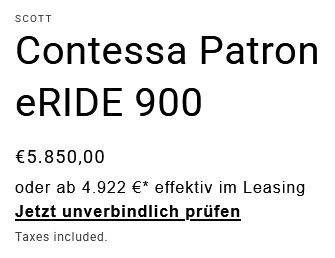

4) Button Texts & Responsibility
You can define the button texts freely (e.g. in the Smart Button or the call-to-action).
We only provide the variables/placeholders.
Responsibility:
The shop is responsible for the final texts and any disclaimers in buttons.
5) Disclaimer & Marking (Asterisks)
We use asterisk marking (*).
The disclaimer appears in several places within the widget (incl. welcome screen, result screen, and detail screen).
The statements are guideline values or estimates (wording such as “approx.” / “from”) to clearly indicate that they are non-binding.
Note:
Since the qualification already takes place when the leasing button is clicked and is displayed directly in the widget, no additional footer disclaimer is required. If it doesn’t disturb the layout, you can of course still place a disclaimer in the footer.
5a) When No Customer Data Is Available
Short explanation:
If there are no individual inputs stored in the widget, we use the standard assumptions specified in the disclaimer as the basis. These are linked/listed in detail on the detail screen (incl. e.g. gross salary 3,700 EUR, tax class I, single, no children, statutory health insurance with 2.5% additional contribution, no church tax, place of residence Hesse, age 40; employer entitled to input tax deduction, no employer contribution, without optional service packages; tax year 2025).
Expectation management:
The example is deliberately conservative – it is not optimized for “maximum savings” and is intended not to create overly high expectations. Concretely: the gross monthly salary is deliberately not 10,000 EUR, but is based on the assumptions listed above.
Example Disclaimer
Welcome Text
This calculation is a non-binding indication. The actual leasing conditions may vary depending on employer policies, tax characteristics, and provider terms. You can find details on the assumptions here.
Detail Text
_This calculation is a non-binding example for orientation. The actual total costs and your personal savings may vary depending on your individual tax situation, contract structure, and provider terms. To determine the actual tax implications, please contact your tax advisor or HR department. If no individual inputs are available, the following assumptions are used: gross salary 3,700 EUR, tax class I, single, no children, statutory health insurance, additional contribution 2.5%, no church tax liability, residence in Hesse, age 40. Employer entitled to input tax deduction, no employer contribution, without optional service packages. Reference: tax year 2025. All information provided without guarantee.
Leasing price according to dealer information.
The calculation uses an average leasing factor and flat-rate insurance costs.
Note on notation:_= general note;**and\***refer to the marked notes in the detail screen.*
6) Display: Price vs. Rate
For a consistent user experience, the result screen should highlight the same element that was already announced on the button – either the rate or the leasing price.
We store this for you in the workflow (e.g. rate_first or price_first).
A change at a later time is possible at any time.
7) Example Texts (Buttons & Teasers)
Without Customer Data
-
„oder z. B. ab 79 € mtl.* im Leasing“
CTA: „Jetzt unverbindlich prüfen“ -
„ab 2.099 €* effektiv, z. B. mit JOBRAD“
CTA: „Jetzt unverbindlich prüfen“ -
„ab 2.099 €* effektiv im Leasing“
CTA: „Jetzt unverbindlich prüfen“
With Customer Data
-
„oder für Sie: ca. 79 € mtl.* im Leasing“
CTA: „Details einsehen“ -
„oder für Sie: ca. 2.099 €* z. B. mit JOBRAD“
CTA: „Details einsehen“ -
„oder für Sie: ca. 2.099 €* als Ihr möglicher Leasingpreis“
CTA: „Details einsehen“